A Backup Is Not Disaster Recovery: Three Kubernetes Demos That Prove It
Three live Kubernetes demos - Velero restores, the GitOps trap, and VolumeGroupSnapshot - that show why backups alone are not disaster recovery.

On this page (9)
At KubeCon + CloudNativeCon Japan 2026, the two of us gave a talk called "Is Your Kubernetes Disaster Recovery Actually Ready?" We opened with a poll. Raise your hand if you take backups of your clusters. Almost every hand in the room went up. Keep it up if you have ever restored a complete stateful application into a clean cluster. We looked around the room. Nobody.
That gap between the two questions is this entire post. Everything below ran live on stage on one laptop with the Wi-Fi off, and every terminal output you see here is a real capture from a rerun of the same lab, not a mockup. The full lab is reproducible from this repo: https://github.com/saiyam1814/kubecon-japan-dr-demo
The one sentence version #
A backup is a recovery point you have. Disaster recovery is a capability you can prove. The three demos walk from the comfortable half of that sentence to the uncomfortable half.
Two numbers rule everything #
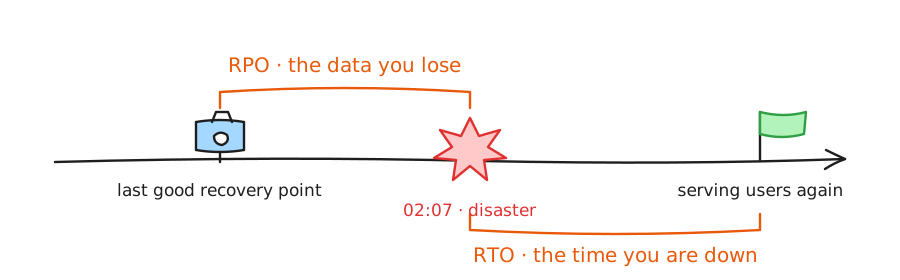
- RPO (recovery point objective) is how much data the business can afford to lose. Hourly backups can support roughly an hour of RPO, but only if every backup completes and the recovery point is usable. Your achieved RPO is the latest recoverable point, not the schedule.
- RTO (recovery time objective) is how long until you serve users again, including detection, decision making, infrastructure recovery, data restore, validation, and traffic cutover.
We kept returning to one point on stage: almost nobody has a real RTO number. People have estimates. An estimate is a guess until a stopwatch has watched a restore. By the end of this post you will see our stopwatch number.
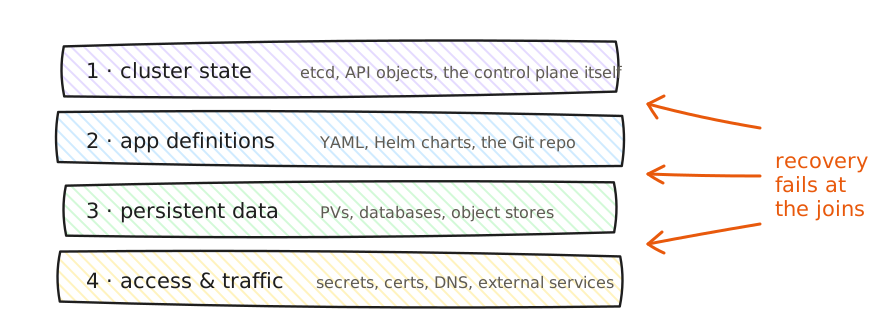
And what has to come back for recovery to count? Four layers: cluster state, application definitions, persistent data, and access plus traffic. Individual layers usually recover fine. Recovery fails at the joins between them.
The lab #
Let's walk through the lab. Two clusters and two services, all local:
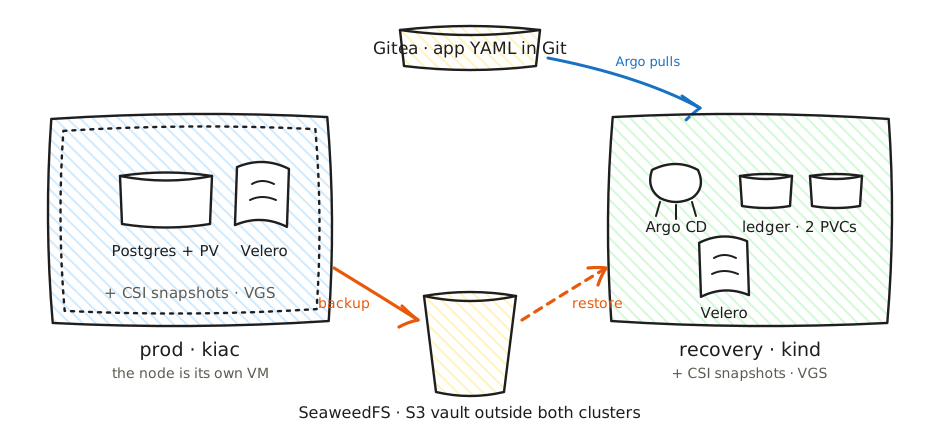
- Production runs on kiac, Saiyam's open source project that runs Kubernetes in Apple containers. Every node is its own lightweight VM with its own kernel. This matters in demo 2: losing production means powering off a machine, not stopping a container that pretends to be one.
- Recovery is a kind cluster that exists before anything goes wrong, which is the first rule of DR.
- The backup vault is SeaweedFS, an S3-compatible object store. Both clusters point their Velero at the same bucket. The vault lives outside both clusters on purpose, so losing either cluster can never take the recovery points with it. To be clear, "vault" here means the backup store, not a secret store.
- Git is a local Gitea with the app manifests, watched by Argo CD in the recovery cluster.
The app is a Postgres guestbook with four rows. Row four is Fatima, our fictional on-call engineer. Her note says "owns the pager tonight." Her pager goes off at 2:07 AM when the region hosting her cluster disappears, and the monitoring dashboard times out because monitoring lived in the same cluster. Keep her in mind.
Demo 1: the backup is real, and what Velero actually does #
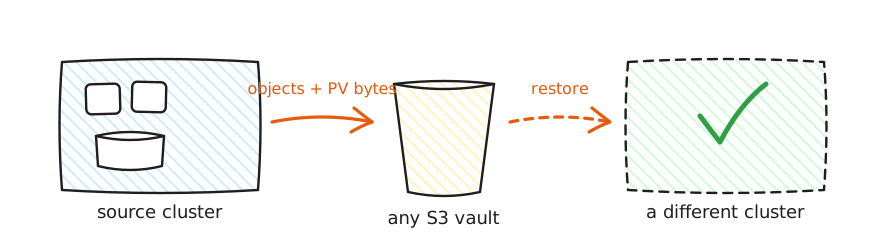
Velero entered the CNCF Sandbox in March 2026. It backs up Kubernetes resources and persistent volume data, and it can protect that volume data three ways: provider or CSI snapshots, file system backup, or CSI Snapshot Data Movement. Our lab uses the last one.
Here is production before anything happens:
$ kubectl -n guestbook exec statefulset/postgres -- \
    psql -U postgres -d guestbook -c 'select * from attendees;'
 id |  name  |            note
----+--------+-----------------------------
  1 | Priya  | came for the demos
  2 | Marcus | still calls it swarm
  3 | Chen   | has tested a restore. once.
  4 | Fatima | owns the pager tonight
(4 rows)One Velero backup of the namespace already ran. Find it and keep its name:
kubectl -n velero get backups.velero.io
export BACKUP=guestbook-rehearsal-20260727001126 # your newest Completed oneMost people stop checking at the green status. Go one step further and look at the part almost nobody checks, the DataUpload:
$ kubectl -n velero get datauploads -l velero.io/backup-name=$BACKUP \
    -o custom-columns='NAME:.metadata.name,PHASE:.status.phase,BYTES:.status.progress.bytesDone'
NAME                                       PHASE       BYTES
guestbook-rehearsal-20260727001126-q2j9m Completed 47989888That is Velero's data mover (Kopia) confirming that 47,989,888 bytes of actual Postgres volume data left the cluster and landed in the S3 vault - the data itself, not just the YAML. If your backup tool cannot show you this number, ask it why.
On stage we then deleted the whole namespace, PVC included, and restored it with one command:
kubectl delete namespace guestbook --wait
velero restore create --from-backup "$BACKUP" --waitThe same four rows came back. Useful, real, and about two minutes. But this is the happy path, and it hides three things Velero does not do automatically:
- Protecting volume data does not automatically make a database backup application consistent. You configure backup hooks to flush or quiesce when the app requires it.
- Restoring onto different infrastructure may require storage class mappings and other transformations. Velero provides the mechanisms; your team must design and test them.
- A backup phase of Completed means the backup operation completed. It does not prove the application will start, contain the expected data, or serve traffic. Only an end to end recovery test provides that evidence.
The question the audience asked: "So Velero restored the namespace. Can it restore the whole infrastructure too?"
No, and the boundary is worth memorizing. Velero's scope is selectable, from one namespace up to the entire cluster including cluster-scoped resources. But Velero restores resources into a cluster that already exists. It does not create the cluster, the nodes, the network, the load balancers, or DNS. Velero recovers what is inside Kubernetes. Something else must recover Kubernetes itself, and that something is infrastructure as code or Cluster API. If your DR plan starts with "restore the backup," ask what the backup gets restored into.
Demo 2: everything is green and the database is empty #
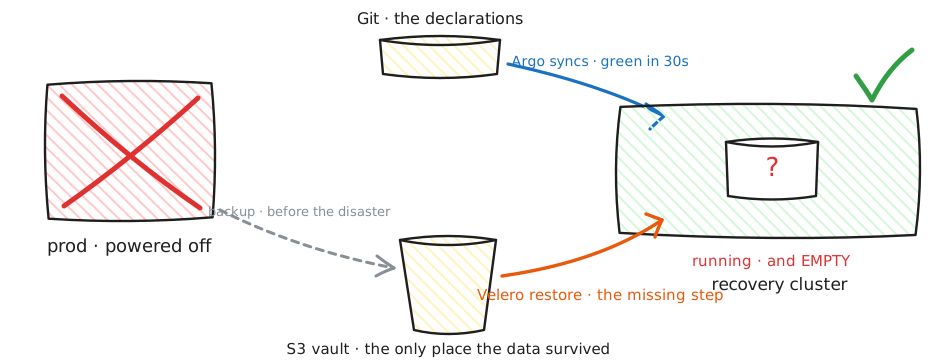
This is the demo the room remembers. We recorded the time and powered off the production VM:
$ date
Sat Aug  8 12:09:33 IST 2026
$ container stop kiac-drprod-control-plane
kiac-drprod-control-plane

$ kubectl --context kiac-drprod get nodes --request-timeout=4s
Unable to connect to the server: net/http: request canceled while waiting
for connection (Client.Timeout exceeded while awaiting headers)Production is gone. Monitoring that lived in it is gone. What is left is the recovery cluster, which existed before the disaster, with its own Velero pointed at the same vault and Argo CD pointed at Git. Let's look at what it does not have:
$ kubectl --context kind-dr-dr get namespaces
NAME                 STATUS   AGE
argocd               Active   12d
default              Active   12d
kube-node-lease      Active   12d
kube-public          Active   12d
kube-system          Active   12d
ledger               Active   9d
local-path-storage   Active   12d
velero Active 12dNo guestbook. This cluster has never run our app.
Now the 2026 on-call reflex: we have GitOps, the whole app is declared in Git, just sync it. So we triggered Argo CD and waited for it to go green:
kubectl -n argocd patch application guestbook --type merge \
  -p '{"operation":{"initiatedBy":{"username":"on-call"},"sync":{"revision":"HEAD"}}}'
kubectl -n argocd wait application/guestbook \
  --for=jsonpath='{.status.sync.status}'=Synced --timeout=300s
kubectl -n guestbook rollout status statefulset/postgres --timeout 300sapplication.argoproj.io/guestbook patched
application.argoproj.io/guestbook condition met
partitioned roll out complete: 1 new pods have been updated...
NAME SYNC STATUS HEALTH STATUS
guestbook Synced ProgressingSynced. Postgres Running and Ready. Every dashboard green. On stage we said this is the moment half the room posts "we are recovered" in Slack. Then we queried the data:
$ kubectl -n guestbook exec statefulset/postgres -- \
    psql -U postgres -d guestbook -c 'select * from attendees;'
ERROR:  relation "attendees" does not exist
LINE 1: select * from attendees;
                      ^
command terminated with exit code 1The database is running and it is empty. Nothing malfunctioned. Git only ever contained the declarations, so Kubernetes did exactly what the YAML says: create a StatefulSet, create a Service, and provision a brand new, empty volume for the PVC. Git has never seen a single row of data. GitOps reconstructed the declared state perfectly and restored none of the stored state.
The question the audience asked: "Why did we need Velero here if GitOps already brought the app back?"
Because there were two different things to bring back and each tool carries exactly one of them: Git stores intent, and backups store state. The data existed in exactly one recoverable place, the Velero backup in the shared vault. So the real recovery is both tools in the right order:
$ kubectl delete namespace guestbook --wait
namespace "guestbook" deleted
$ velero restore create --from-backup "$BACKUP" --wait
Restore completed with status: Completed.
$ kubectl -n guestbook exec statefulset/postgres -- \
    psql -U postgres -d guestbook -c 'select * from attendees;'
 id |  name  |            note
----+--------+-----------------------------
  1 | Priya  | came for the demos
  2 | Marcus | still calls it swarm
  3 | Chen   | has tested a restore. once.
  4 | Fatima | owns the pager tonight
(4 rows)
$ date
Sat Aug 8 12:11:28 IST 2026Fatima is back, on a cluster that never ran the app, and even on different infrastructure: the backup was taken on a kiac VM and restored onto kind. A disaster may force you onto different infrastructure, so portability is something you test, not assume.
Now the stopwatch. On stage, from powering off production to validated data in the recovery cluster took four minutes, 16:06 to 16:10 on the on-screen clock. The capture above, a rehearsed rerun, took just under two. The line we used on stage is the one we want you to keep: the first time we "recovered," when the dashboards went green and the Slack message went out, was not the recovery. The second time, when the data came back and we checked it, was. And remember this measures only the scripted slice. A production RTO wraps detection, decision, traffic cutover, and failback around it.
Demo 3: two perfect snapshots, one broken application #
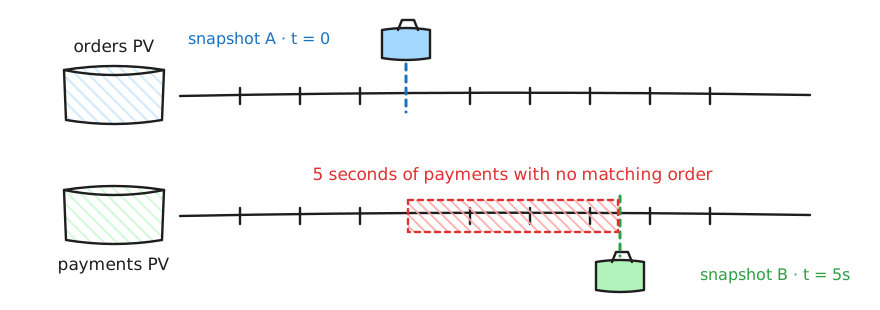
Real stateful applications span multiple volumes: database data plus WAL, Kafka brokers, replica sets. Our stand-in is a tiny ledger app writing matched pairs, order n to one PVC and payment n to another, five times a second. One invariant: every payment must have its order.
We snapshotted the orders volume, let the app keep writing for five seconds, then snapshotted the payments volume. Each one is a plain CSI VolumeSnapshot, and 121152 is the run id the lab script stamps on every object in one run:
kubectl -n ledger apply -f - <<SNAP
apiVersion: snapshot.storage.k8s.io/v1
kind: VolumeSnapshot
metadata:
  name: torn-orders-121152
spec:
  volumeSnapshotClassName: csi-hostpath-snapclass
  source:
    persistentVolumeClaimName: orders-pvc
SNAP
sleep 5   # the app keeps writing matched pairs the whole time
# then the identical VolumeSnapshot for payments-pvc, five seconds latervolumesnapshot.snapshot.storage.k8s.io/torn-orders-121152 created
volumesnapshot.snapshot.storage.k8s.io/torn-orders-121152 condition met
volumesnapshot.snapshot.storage.k8s.io/torn-payments-121152 created
volumesnapshot.snapshot.storage.k8s.io/torn-payments-121152 condition metBoth ReadyToUse. Both individually perfect. Then we restored both into new PVCs using dataSource, the standard way to restore any CSI snapshot, and ran a verifier job that mounts both restored volumes and compares the last sequence number on each:
kubectl -n ledger apply -f - <<PVC
apiVersion: v1
kind: PersistentVolumeClaim
metadata:
  name: restored-torn-orders
spec:
  accessModes: ["ReadWriteOnce"]
  storageClassName: csi-hostpath-sc
  resources:
    requests:
      storage: 100Mi
  dataSource:
    apiGroup: snapshot.storage.k8s.io
    kind: VolumeSnapshot
    name: torn-orders-121152
PVC
# same PVC for the payments snapshot, then the verifier Job from the repo:
# manifests/ledger/verify-job.tmpl.yamllast order committed : 108352
last payment committed : 108377
[FAIL] 25 payments have NO matching order.
[FAIL] Each snapshot succeeded. The restore is still wrong.Twenty five payments referencing orders that do not exist. Money moved for nothing. No component failed, every operation reported success, and the combined recovery point describes a moment in time that never existed. In production, that five second gap is simply your backup tool walking a list of a hundred PVCs one by one.
The fix is a Kubernetes API that reached GA in 1.36 in April 2026: VolumeGroupSnapshot. One object selects the PVCs by label, and the CSI driver receives one request for a coordinated, crash consistent recovery point across all of them:
apiVersion: groupsnapshot.storage.k8s.io/v1
kind: VolumeGroupSnapshot
metadata:
  name: ledger-group-snap
spec:
  volumeGroupSnapshotClassName: csi-hostpath-groupsnapclass
  source:
    selector:
      matchLabels:
        group: ledger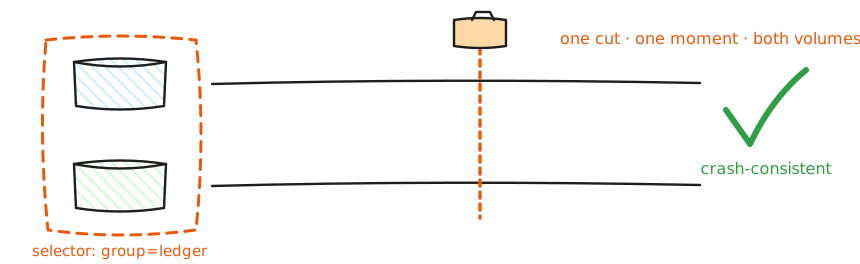
The group request produces managed member snapshots, one per volume, from a single point in time:
volumegroupsnapshot.groupsnapshot.storage.k8s.io/group-121152 created
volumegroupsnapshot.groupsnapshot.storage.k8s.io/group-121152 condition met

NAME               GROUP          READY
snapshot-63f367... group-121152   true
snapshot-c3a36e... group-121152 trueThe member snapshots are auto-named; find them through the group they belong to, then restore them exactly like the individual snapshots above and run the same verifier:
kubectl -n ledger get volumesnapshot \
  -o custom-columns='NAME:.metadata.name,GROUP:.status.volumeGroupSnapshotName,READY:.status.readyToUse'
# restore each member with a dataSource PVC, run the verifier againlast order committed : 109169
last payment committed : 109169
[OK] Every payment has a matching order. Restore is consistent.Full disclosure, the same one we gave on stage: our lab uses the CSI hostpath test driver, which implements the group RPCs but archives member volumes sequentially, so the writer is paused during the group snapshot to keep the demo deterministic. What the demo shows is the GA API and the restore workflow. The same point in time guarantee itself belongs to the storage backend of a production driver. Which leads to the practical takeaways:
- Support is driver specific. A driver that supports ordinary VolumeSnapshots proves nothing about group snapshots. Ask your storage vendor whether they implement the CSI group RPCs. As of mid 2026, most of the major cloud drivers we checked do not.
- Setup is explicit: the CRDs and feature gates on the snapshot controller and CSI sidecar are your job.
- Crash consistent is not application consistent. The API removes cross volume timing skew. It does not flush or quiesce your database.
What is still broken #
The demos expose gaps that no single tool closes today:
- No common cross-cluster failover contract. Data, workload, cluster, traffic, and identity all have tools, and every row is missing the same thing: a shared contract with the next row. Products answer this inside their own APIs; core Kubernetes does not define the sequence.
- No standard recovery unit for an application. Core Kubernetes has no maintained Application resource that says which objects, operators, data services, and external dependencies must recover together. Velero uses namespaces and labels, Argo has Applications, Helm has releases, and each draws the boundary differently.
- Backup success is treated as recovery proof. Some teams test resilience by deleting a pod and watching it return. That tests workload reconciliation, not recovery. A recovery test restores into a clean target, validates data and the user path, and measures the whole thing.
There is community work here: the Cloud Native Business Continuity initiative proposal under CNCF TAG Operational Resilience (disclosure: Saiyam is one of the TAG chairs). It is an open proposal seeking contributors, aiming at a landscape gap analysis, updated backup and DR guidance, and reference architectures. If this post resonates, that is where to help: https://github.com/cncf/toc/issues/1779
From a laptop to production #
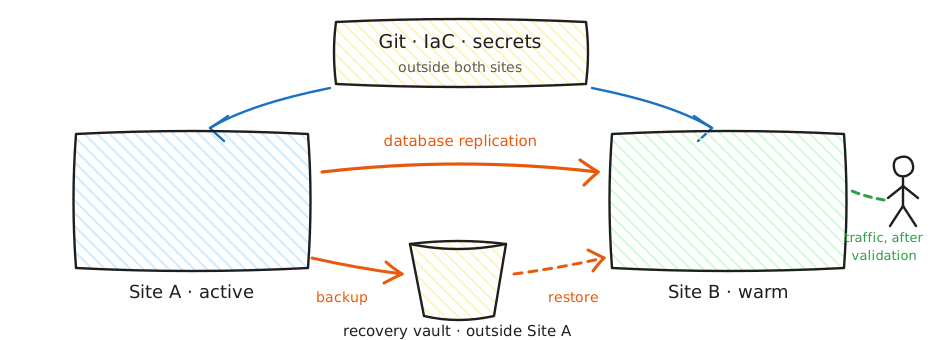
Every piece of the lab is a stand-in. The kiac cluster is your active region. The kind cluster is your recovery region, account, or second provider. SeaweedFS is a cross region S3 bucket or offsite object store. Gitea is the Git and infrastructure config that must survive the disaster. Powering off the VM is the region loss. The principles that transfer as-is: recovery points outside the failure domain, a recovery target that exists before the disaster, restore order, and application level validation. The exact failure modes and timings still need testing on your production platforms.
Now the questions are for you #
We ended the talk with questions instead of answers, and we will end this post the same way. Answer these honestly, ideally out loud in your next team meeting:
- Are you treating backup as DR? Backup answers "where is my data." DR answers "how fast am I serving traffic again, and who does what at 2 AM." If your entire DR plan fits inside a Velero schedule, you have a backup plan.
- Who owns your Kubernetes DR, end to end, by name? Platform backs up the cluster, the app team assumes the platform handles it, the DBA asks which cluster. If ownership stops at team boundaries, nobody owns recovery.
- When did your team last restore a complete stateful application into a clean cluster, validate the data, and time it? Restored, not just backed up.
- Can you state RPO and RTO for your most critical application, and has a stopwatch ever confirmed the RTO?
- Do your multi volume applications have one coordinated recovery point, or a pile of individually perfect snapshots from different moments?
- If your region disappeared right now, do your Git repos, secrets, and backups survive it, or do they live in the blast radius?
If any answer made you uncomfortable, the fix is one rehearsal, not a new tool: pick one stateful app this month, restore it into a clean cluster, validate the data and the user path, and write down the time. Turn the guess into a number. That is the whole difference between having backups and having disaster recovery, and it is the difference between Fatima's night ending in panic or ending in a runbook she has already executed.
The lab, the commands, and everything you saw here: https://github.com/saiyam1814/kubecon-japan-dr-demo
We would genuinely like to hear what you do today: who owns DR at your company, and when did you last run a real restore? Tell us on X or LinkedIn.
Saiyam is working as Head of DevRel at vCluster Labs. He is the founder of Kubesimplify, focusing on simplifying cloud-native & AI infrastructure. He is KubeCon Co-chair and has worked on many facets of Kubernetes, including machine learning platforms, scaling, multi-cloud, & managed Kubernetes services. When not coding, Saiyam contributes to the community by writing blogs and organizing local meetups for Kubernetes and CNCF. He is also a CNCF TAG OpsRes Chair & can be reached on Twitter @saiyampathak.
Get new posts in your inbox.
Spotted a typo or want to improve this post? Edit on GitHub →